How to composite a Skybrari sky in Luminar Neo — the 90-second workflow.
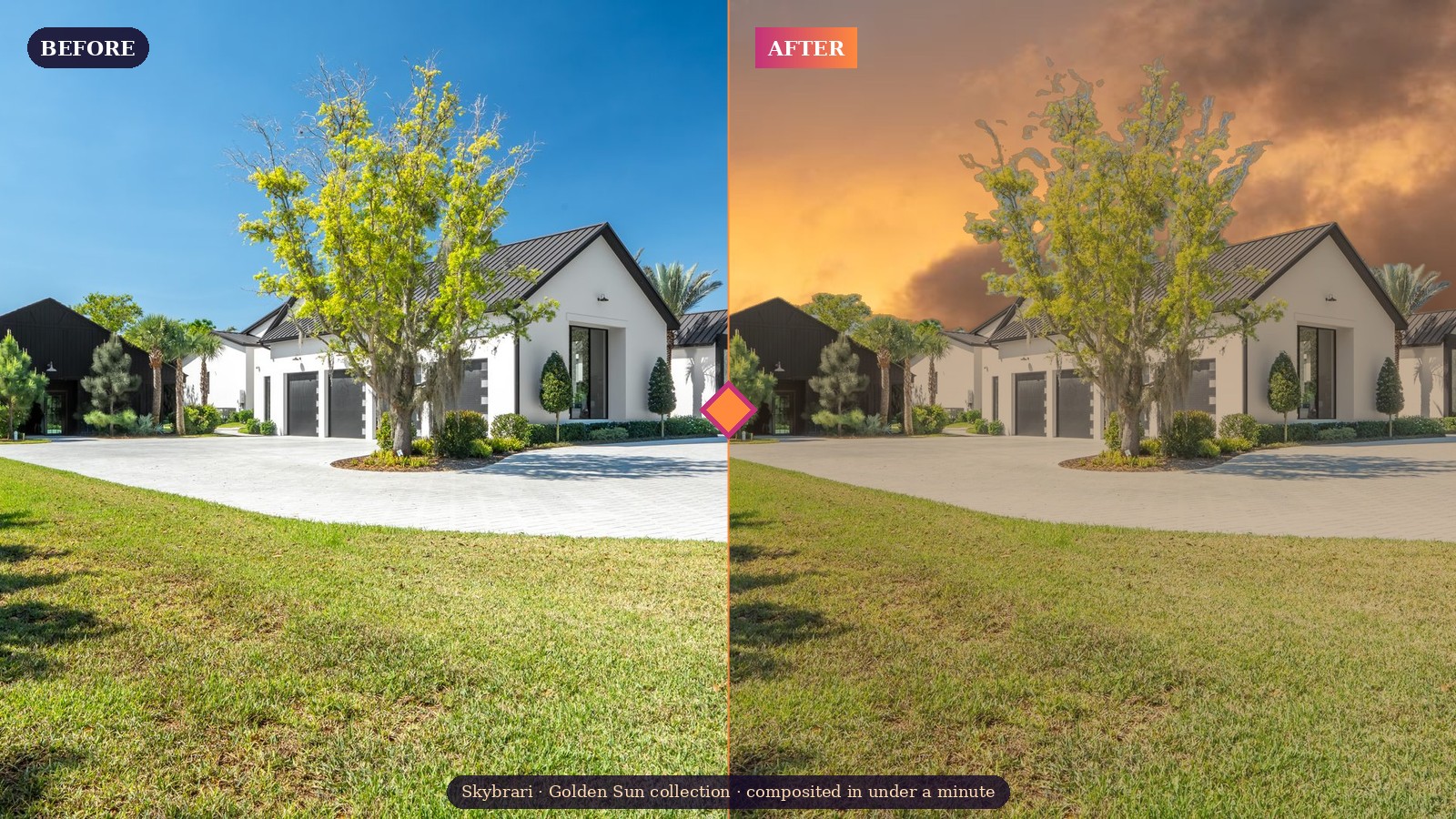
Luminar Neo's Sky AI panel is the single fastest way to composite a sky in a photograph. It auto-detects the horizon, masks the existing sky with surprisingly clean edges, and relights the foreground to match the new sky's color temperature — all in about 90 seconds per image.
Here's the exact workflow for dropping a Skybrari panoramic sky into your shot, plus the three sliders that actually matter and a tip for applying the same sky across a wedding gallery or a 20-photo real estate listing in one pass.
What you'll need
- Luminar Neo (any version from 2024 onward — tested on the April 2026 release)
- A Skybrari panoramic sky file (JPG, any collection)
- A photo where the existing sky is the weakest element — overcast listing exteriors, golden-hour scenes that got clouded over, travel shots taken at the wrong time of day
The 5-step workflow
- Open your photo in Luminar Neo. Click Edit in the top navigation to enter the edit workspace.
- Open the Sky AI panel. In the right sidebar, click Creative, then expand Sky AI. Luminar detects your existing sky automatically within 2-3 seconds.
- Load your Skybrari sky. Click the dropdown next to Sky Selection and choose Load Custom Sky Image…. Navigate to the Skybrari collection folder you unzipped, pick any JPG, click Open. Luminar composites it immediately.
- Turn on Relight Scene. This is the single most important toggle. It re-tints your foreground's highlights and shadows to match the new sky's color temperature. Without it, a sunset sky on a midday photo reads as obviously composited.
- Fine-tune and export. Adjust the three sliders below until the composite feels right. Export as JPG or PSD.
The three sliders that actually matter
1 · Sky Orientation
Slides the sky left and right across the frame. Use this when the Skybrari sky has a bright spot (the "sun" area) and you want it to fall on the opposite side of your photo's existing shadows. If shadows in your photo fall right, the sun area should be on the left.
2 · Horizon Blending
Controls how soft the transition is between the new sky and the foreground. Default is usually too hard — increase to around 30 for most photos. For photos with busy horizons (treelines, power lines, mountain ridges), go even softer: 40–50.
3 · Sky Global
Brightness, saturation, and warmth of the Skybrari sky itself. Most of the time you'll want to reduce saturation by 5–10% — panoramic skies can read as slightly over-saturated when cover-fit into a non-panoramic frame. Brightness rarely needs more than ±10.
The batch-editing trick (real estate + wedding workflows)
This is where Luminar + Skybrari saves the most time. If you need the same sky across 15–40 photos (exteriors for a single listing, venue shots for a wedding gallery):
- Import your whole session into Luminar's catalog (drag the folder in).
- Edit the first photo with Sky AI as above. Save it as a preset.
- Select the remaining photos. Right-click → Sync Adjustments → choose your preset.
- Luminar applies the sky + relight across every selected image. Auto-masking still runs per image, so each composite is independently correct for its own horizon line.
A full wedding-venue exterior set (30-40 images) takes about 4 minutes in Luminar this way. Same work in Photoshop would take 90 minutes.
What if the result looks wrong?
There's a halo around tree branches
Luminar's segmentation kept a few pixels of the original sky. Raise Horizon Blending to soften the seam, or use the Edit Mask button inside Sky AI to paint black into the halo area manually.
The foreground still looks midday under a sunset sky
You probably forgot to turn on Relight Scene. Toggle it on. If it's already on and the effect is too subtle, slide Relight Amount up to 70-80.
The sky is tilted relative to my horizon
Skybrari panoramic skies assume a level horizon. If your photo was shot at an angle, level it first in the Develop panel before opening Sky AI.
When to use a different editor instead
Luminar is the fastest, but not always the most precise. For hero shots — the top-of-listing image or the wedding album cover — Photoshop's Sky Replacement gives you pixel-level control that Luminar's automation can't match. The Skybrari compositing guide PDF walks through Photoshop, Capture One, ON1, and Affinity in the same level of detail as this post.
For volume work (listings, weddings, editorial batches): Luminar.
For one precise hero shot: Photoshop.
Which Skybrari collection fits your work
If you're reading this and don't have a Skybrari library yet:
- Real estate / listings: Mostly Clear Blue Skies ($96) for daytime, Vivid Color Sunsets ($120) for hero exteriors.
- Weddings: Whimsical and Wispy ($120) for romantic portraits, Puffy Cloud Sunrise ($115) for soft ceremony exteriors.
- Editorial / travel: Distant Storm Sunsets ($120) for drama, Post-Sunset ($120) for moody late-light.
- Everything at once: the Full Library Bundle ($1,995) — all 1001 skies across all 20 collections.
Questions about the workflow? Reply to your Skybrari account email, we read every message.